How to Mount a TV Above an Electric Fireplace Without Heat Damage or a Sore Neck
A TV over the fireplace looks clean and saves floor space, and it is one of the most common living room setups I see. The two worries that stop most people are heat and height. Will the fireplace cook the TV, and will the screen sit so high that watching it hurts your neck?
Both worries have clear answers. This guide shows you how to mount a TV above an electric fireplace the safe way, from reading your fireplace manual to the final heat check. You will end the day with a TV that sits at a comfortable height, a mount bolted into solid wood, and cables out of sight.
Plan on about two hours for the whole job, plus a short heat test at the end. One helper makes the lifting step far safer, so ask a friend or family member to stay for that part. If your wall needs new wiring or a new outlet, call a licensed electrician instead of running cable yourself.
Safety note: Electric fireplaces still make real heat, and a TV is a heavy object on your wall. Turn the fireplace off and let it cool before you start. Switch off the circuit breaker for any outlet you will work near.
Never drill into a wall without checking for wires and pipes first, and never hang a TV from drywall alone. If any step feels outside your comfort zone, stop and call a pro.
What You Need
Tools
- Stud finder
- Tape measure
- Level (at least 24 inches long)
- Drill and drill bits
- Socket wrench set
- Pencil and painter’s tape
- Step ladder
Materials
- TV wall mount rated above your TV weight
- Lag bolts (usually included with the mount)
- Cable raceway or in-wall cable kit
- Surge protector power strip
- Optional: infrared thermometer
- Optional: tilt mount for high placement
Check your TV manual for its VESA pattern and weight before you shop for a mount. The mount box lists both numbers.
At a Glance: The 8 Steps
- Read your fireplace manual and find the clearance rules
- Measure your TV, your seat, and your wall
- Pick a mount that fits your TV and your wall
- Find the studs and mark the center line
- Mark the bracket holes and drill pilot holes
- Bolt the bracket into the studs
- Hang the TV and set the tilt
- Hide the cables and run a heat check
Read your fireplace manual and find the clearance rules
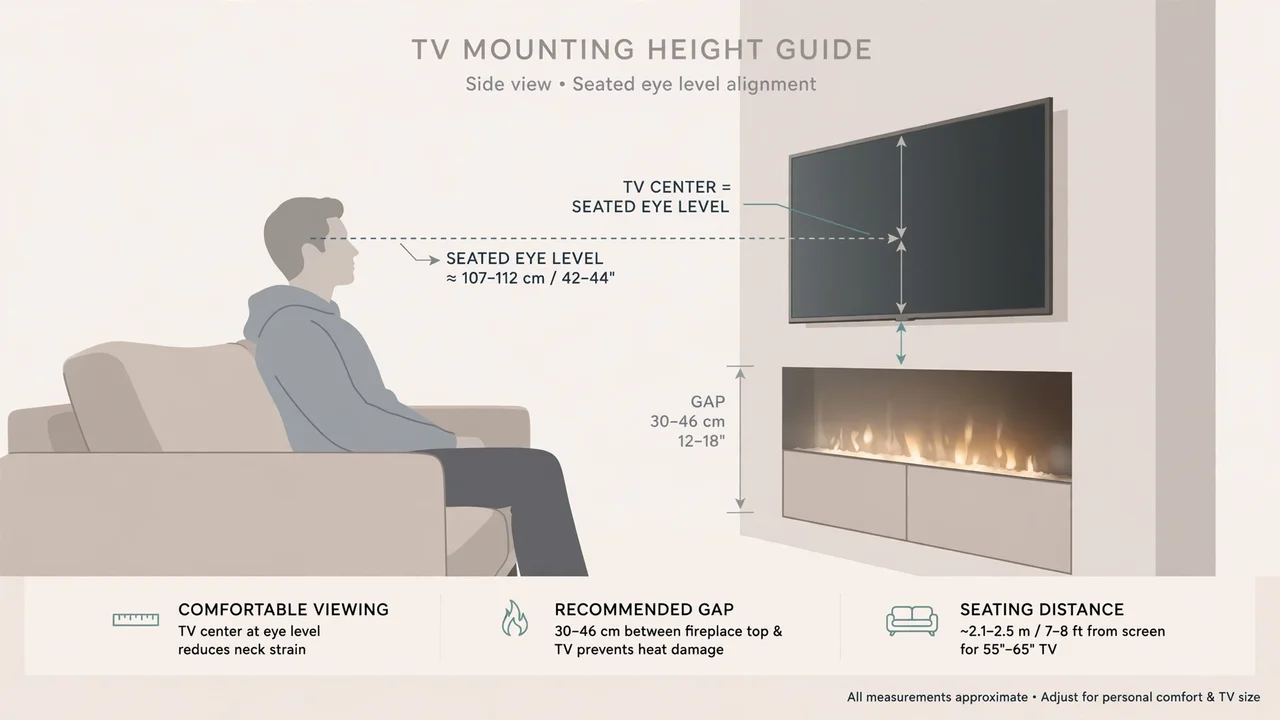
Every electric fireplace model has its own clearance numbers, and those numbers are the ones that matter. Open your manual and look for the section on clearances or safe distances above the unit. Write the number down on a sticky note and keep it near your tape measure.
Where the heat leaves the unit changes everything. A fireplace that vents heat from the front sends warm air out into the room, so the wall above it stays cooler. A unit that vents from the top sends heat straight up the wall toward your TV, so it needs more space above it. If you are unsure which type you own, read our guide on how an electric fireplace makes heat and check the vent slots on your model.
Heads Up: Heat Is the Real Risk
Heat shortens the life of TV parts and can warp a screen over time. If your manual gives no clearance number for a TV above the unit, contact the maker before you drill. Never mount a TV above a fireplace that vents hot air from the top unless the maker says the spot is safe.
Measure your TV, your seat, and your wall
Sit in your usual seat and have your helper hold a tape measure from the floor to your eye level. That height, often around 42 inches, is where the center of your TV screen should sit. Mark that spot on the wall with a small piece of painter’s tape.
Measure the width of your fireplace and the width of your TV, then find the center of the fireplace with your tape measure. A TV that is wider than the fireplace can still look fine, but a TV that is much narrower than a wide fireplace can look lost. Use painter’s tape to outline the TV shape on the wall so you can see the size before you commit. If your fireplace is an insert set into an opening, measure that opening with the same care shown in our guide on how to measure for an electric fireplace insert.
Pick a mount that fits your TV and your wall
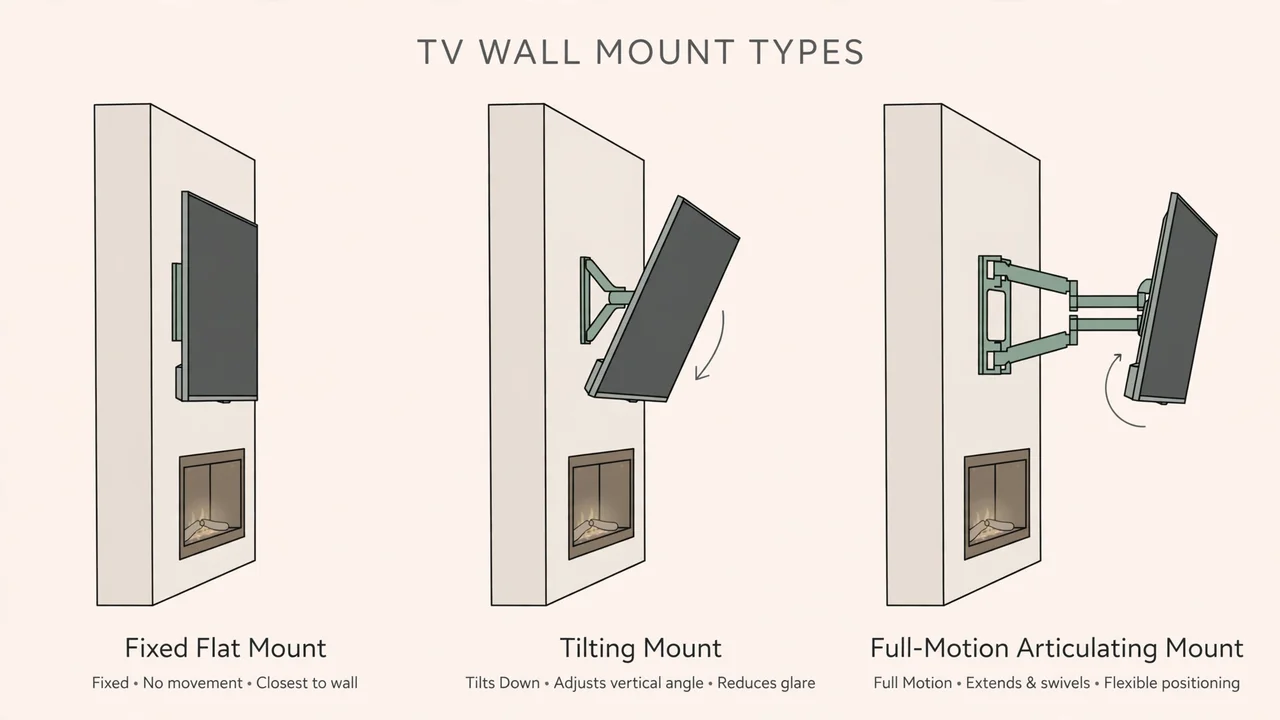
Mounts come in three main types, and the right one depends on how high your TV will sit. A fixed mount holds the TV flat and close to the wall, which looks neat but gives you no way to angle the screen down. A tilt mount lets you angle the screen down a few degrees, which helps a lot when the TV sits above a fireplace. A full motion mount swings out and turns, which suits corner setups and rooms with more than one seating area.
Check two numbers before you buy: the VESA pattern on the back of your TV and the weight of your TV. The mount box lists the VESA sizes and the maximum weight it can hold. Pick a mount rated for more than your TV weighs, not exactly the same. If your TV weighs 40 pounds, a mount rated for 80 pounds gives you a solid safety margin.
Pro Tip: Choose Tilt When in Doubt
If your TV center will sit more than a few inches above eye level, a tilt mount is worth the small extra cost. Angling the screen down by even 5 degrees cuts glare from room lights and takes pressure off your neck during long viewing sessions.
Which Mount Type Fits Your Setup
| Mount type | Best for | Gap from wall | Angle control |
|---|---|---|---|
| Fixed | TV at eye level, clean look | About 1 inch | None |
| Tilt | TV above a fireplace | About 2 inches | Tilts down 5 to 15 degrees |
| Full motion | Corners, several seating spots | Extends out from the wall | Tilts and swivels |
Gaps and tilt ranges vary by brand, so check the product page for the exact model you buy.
Find the studs and mark the center line
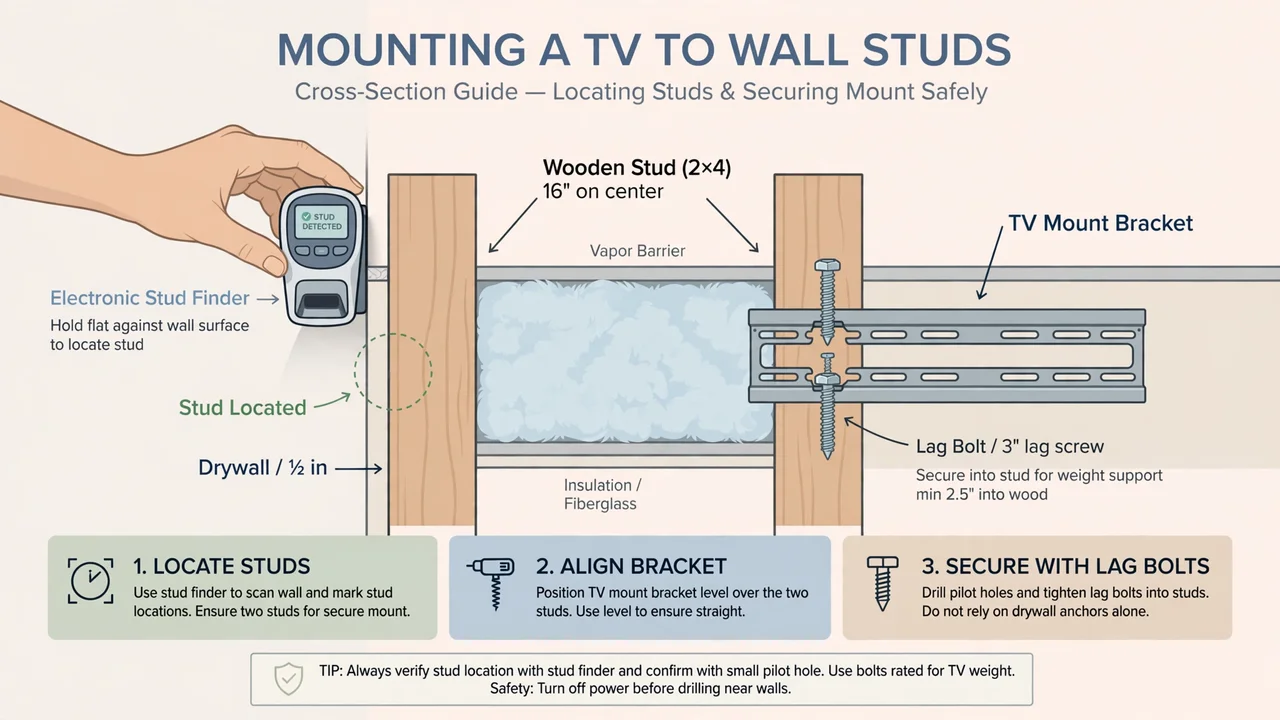
A TV must hang from wood studs, never from drywall alone. Run your stud finder slowly across the wall above the fireplace and mark each stud edge with a pencil. Studs in most homes sit 16 inches apart from center to center, so once you find one, the next should be nearby.
Mark the center line of your fireplace on the wall with a light vertical pencil line. Then mark the center of your bracket on that same line. If your studs do not line up with the center of the fireplace, shift the bracket to the nearest stud pair and center the TV on the bracket instead. If you are still planning the wall itself, our guide on how to build an electric fireplace wall shows how the framing and the fireplace fit together.
Mark the bracket holes and drill pilot holes
Hold the wall bracket against the wall with your level on top of it. Line up the center mark on the bracket with the center line on your wall, then check that the bracket is level before you mark anything. A bracket that is off by a small amount at this stage shows up as a crooked TV later.
Mark each bolt hole with a pencil through the bracket slots. Set the bracket aside and drill a pilot hole at each mark, using a drill bit slightly smaller than your lag bolts. Pilot holes keep the wood from splitting and make the bolts turn in smoothly. Stop and check the depth of each hole with the bit so you do not drill through the other side of the wall.
Bolt the bracket into the studs
Place the bracket back on the wall and drive a lag bolt into each pilot hole with your socket wrench. Turn each bolt until it is snug against the bracket, then give it one more quarter turn. Overtightening can strip the wood and weaken the hold, so stop when the bracket stops moving.
Test the bracket by pulling down on it firmly with both hands. It should not flex or shift at all. If it moves, back the bolts out, check that your pilot holes hit the center of the studs, and start that step again. A solid bracket now is what keeps a heavy TV safe later.
Heads Up: Drywall Anchors Are Not Enough
Plastic anchors and toggle bolts are made for light loads such as shelves and picture frames. A TV pulls down and out with far more force, and anchors can fail without warning. Every lag bolt must go into a wood stud. If your wall has metal studs, use the fasteners made for metal studs and follow the mount maker’s guide.
Hang the TV and set the tilt
Attach the vertical arms to the back of your TV first, while the TV lies face down on a soft blanket. Tighten the arm screws by hand, then check that both arms sit at the same height. Lay the TV flat again and have your helper lift one side while you lift the other.
Hook the arms over the top of the wall bracket and let the TV settle onto it. Push the bottom of the TV toward the wall until it clicks into place, then tighten the safety screws at the bottom of the arms. Step back to your seat and check the tilt. Angle the screen down a little at a time until the picture looks clear from your seat without neck strain.
Hide the cables and run a heat check
Plug in the power and HDMI cables before you push the TV flat against the wall for the last time. Run the cables down the wall inside a paintable raceway, or use an in-wall cable kit if your local code allows it. Keep all cables clear of the fireplace heat vent, and leave a little slack so the TV can tilt without pulling on the plugs.
Turn the fireplace on to its highest heat setting and let it run for 30 minutes. Place your hand on the wall behind the TV and on the back of the TV itself. The wall should feel warm at most, never hot enough that you pull your hand away.
If you own an infrared thermometer, check the wall temperature and compare it with the limit in your fireplace manual. If the wall feels hot, turn the heat down, raise the TV, or add a mantel shelf to deflect heat away from the screen. Our guide on whether electric fireplaces are safer than space heaters covers more of the heat safety habits that keep a living room safe.
What Changes After Mounting
Before
- TV sits on a stand and eats floor space
- Cables trail across the floor
- Screen height depends on the stand
- Fireplace wall feels bare or crowded
After
- TV floats above the fireplace, floor is clear
- Cables run hidden in a raceway
- Screen center sits near seated eye level
- Fireplace and TV read as one feature wall
Troubleshooting: If This Happens, Try This
| If this happens | Try this |
|---|---|
| The TV looks crooked after hanging | Loosen the arm screws a little, level the TV, then retighten. Many mounts have small leveling screws for this. |
| The wall feels hot during the heat test | Turn the heat down, check the manual clearance, and raise the TV or add a mantel shelf to deflect heat. |
| The stud finder gives mixed readings | Calibrate it on a clear stretch of wall, move slowly, and confirm each stud by finding both edges. |
| Glare washes out the picture | Tilt the screen down a few degrees, close the nearest blinds, or move a lamp that reflects in the screen. |
| Your neck hurts after watching | Lower the TV if you can, add more tilt, or move your seat back so the viewing angle drops. |
| Cables pull tight when you tilt the TV | Add slack inside the raceway and use longer HDMI cables so the plugs never take the strain. |
Frequently Asked Questions
Is it safe to mount a TV above an electric fireplace?
Yes, when you follow the clearance numbers in your fireplace manual and keep the TV out of the path of hot air. Front-venting models are usually the easiest to work with, while top-venting models need more space above the unit. Run the heat test in step 8 before you call the job done.
How high should a TV be above an electric fireplace?
Aim for the center of the screen at your seated eye level, often around 42 inches from the floor. Your fireplace manual sets the minimum gap between the top of the unit and the bottom of the TV, so that number comes first. A tilt mount helps when the fireplace pushes the screen higher than ideal.
Can I mount a TV on drywall above a fireplace?
No, not with drywall anchors alone. Every lag bolt must go into a wood stud, because a TV pulls down and out with more force than anchors can hold. If you cannot find two studs in the right spot, ask a pro about a stud-spanning bracket or a different wall.
What size TV mount do I need above an electric fireplace?
Match the mount to your TV VESA pattern and pick one rated for more than your TV weighs. A tilt mount is the usual pick above a fireplace because it angles the screen down toward your seat. Check the mount box for both numbers before you buy.
Will the heat from my electric fireplace damage my TV?
It can over time if hot air blows straight onto the screen or the back of the TV. Keep the clearance your manual states, keep the heat vent clear, and run the 30 minute heat test after mounting. If the wall behind the TV feels hot to the touch, raise the TV or lower the heat setting.
Quick Reference Card
What You Need
Stud finder, tape measure, level, drill, socket wrench, TV mount rated above your TV weight, lag bolts, cable raceway.
Steps
- Read the manual clearance rules
- Measure TV, seat, and wall
- Pick the right mount
- Find studs and mark the center line
- Mark holes and drill pilot holes
- Bolt the bracket into the studs
- Hang the TV and set the tilt
- Hide cables and run the heat check
Remember: screen center at seated eye level, lag bolts into studs only, and a 30 minute heat test before you relax.
Your TV now hangs above your electric fireplace at a height that feels right from your seat, bolted into solid wood, with the cables out of sight. The heat test tells you the setup is safe, and the tilt takes care of the glare.
If the wall still feels bare around the screen, the next project is the trim and finish. Our guide on how to make an electric fireplace look built in shows how to frame the whole feature wall so the TV and the fireplace read as one piece. Enjoy the view.